
Let them talk. Read what they say.
The other half of a conversation is the hard half. Live translate listens to whoever you are talking to and writes each sentence in your language as it is said — so you can follow a doctor, a landlord or a taxi driver without asking anyone to stop and repeat themselves into a phone.
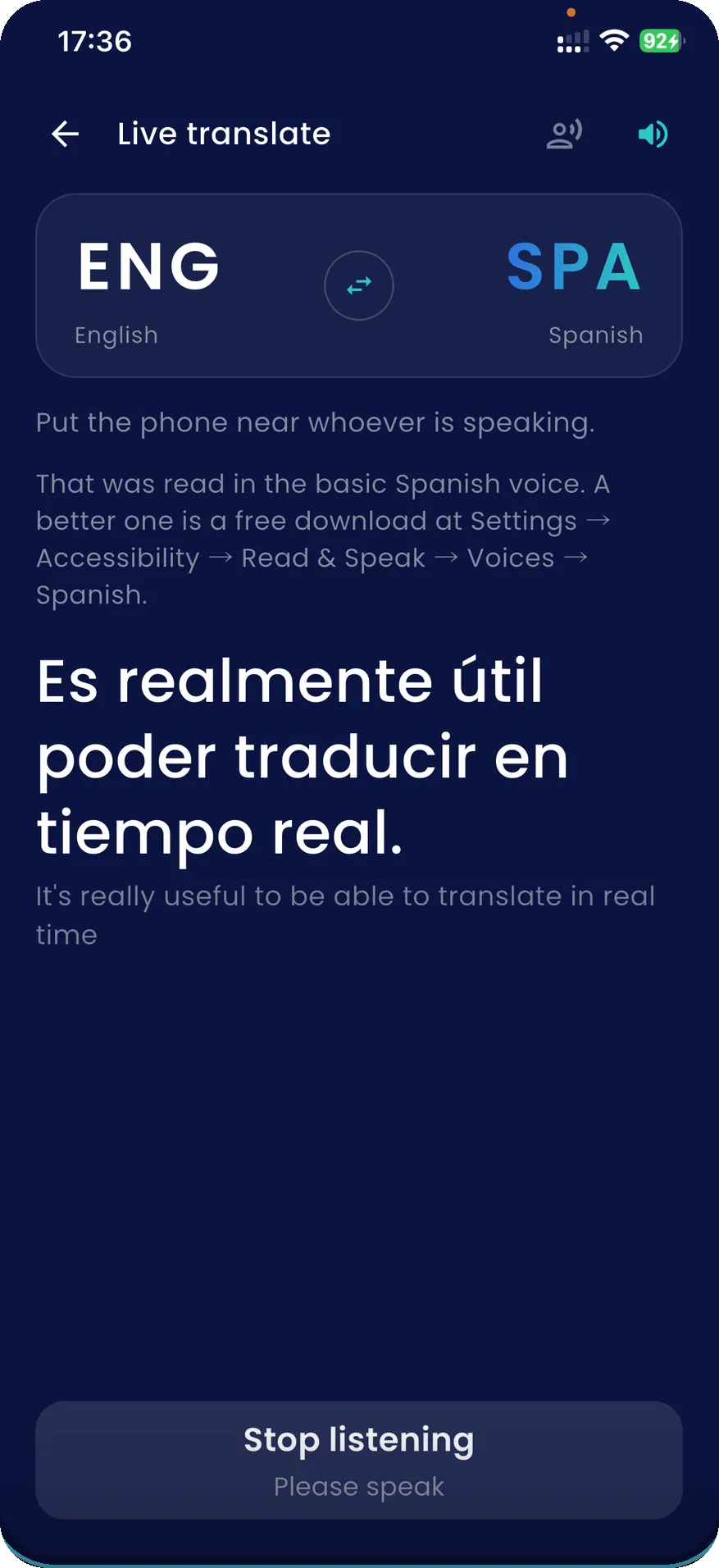
Near them, not near you
The phone has to hear the person speaking, so it goes on the table between you or in your hand held towards them — not tucked beside you where you can read it comfortably. The app says so on the screen, because it is the one thing that decides whether any of this works.
Then you read. With earbuds in you can turn on Read aloud and hear the translation as well, though it starts switched off and the next section explains why.
A sentence at a time, a couple of seconds behind
This is not the simultaneous interpreting you see at a summit, and no phone does that. A sentence has to finish before it can be recognised and translated, so each one appears a moment after it was said. In practice that is fast enough to follow somebody and too slow to talk over them — which is the right way round for a conversation you are trying to understand.
Reading is the half that keeps up. You read faster than any voice speaks, so the screen stays level with the conversation while a spoken translation falls further behind the longer someone talks.
So Read aloud is off to begin with, and when it is on it skips. In a half-hour test of continuous speech the voice managed about a quarter of the sentences, because a translation takes roughly as long to say as the original took and there is no gap to catch up in. The app says so on screen the moment it starts skipping, rather than letting you believe you have heard everything.The transcript keeps every sentence.
Nothing is kept
A live session leaves nothing behind — not on your phone, not with us. Close the screen and the transcript is gone. A record of what a doctor said is not the same kind of thing as a photographed menu, and we would rather not be holding one. What stays on your phone.
Offline where your phone can be
It uses your iPhone's own dictation, offline first, so with the speech pack installed it runs with no connection at all. Without one it tells you, instead of quietly spending roaming data. What works with no internet.
It checks before it starts
Your iPhone can hear roughly half of the 58 languages, and here the one that matters is theirs. The app checks that it can hear that language, and that both translation models are on the device, before the session begins — not halfway through a sentence.
Questions
What does live translate do?
It listens to the person you are talking to and writes each sentence in your language as it is said, one after another down the screen. You read it. If you have earbuds in, it can read the translation to you as well.
Does live translation work offline?
It uses your iPhone's own offline dictation first, so where your phone has the speech pack for the language being spoken it works with no connection at all. Where it does not, the app says so rather than quietly using roaming data. The translating itself always happens on the phone, and typing works offline in all 58 languages.
Can it keep up with a real conversation?
It works a sentence at a time, not word by word. A sentence has to finish before it can be translated, so each one lands a couple of seconds after it was said. That is fast enough to follow someone and not fast enough to interrupt them, which is why the screen is the main output and the voice is optional.
Is the conversation saved anywhere?
No. Nothing from a live session is kept — not on your phone and not anywhere else. When you close the screen the transcript is gone. That is a deliberate decision rather than a missing feature: a record of what a doctor or an official said is not the same kind of thing as a photographed menu, and the safest place for it is nowhere.
Which languages can it hear?
Roughly half of them, and which half depends on the speech packs your own iPhone has, so no web page can answer it honestly. It matters here because the language that has to be heard is the other person’s. The app checks before the session starts and tells you if it cannot hear that language, rather than leaving you to find out with someone mid-sentence.
Try it on the next conversation
The first 15 translations are free, with ads and no card. A whole live session counts as one of them. If your phone cannot hear the language you need, the app will say so before you start.
Get SofiLingo on the App StoreNext: saying something back · a translator for going abroad · what stays on your phone · all 58 languages