
Point it at the writing. Read it in yours.
Station boards, medicine packets, a ticket machine, a page of a book, the small print on a parking sign. Anything with words on it, translated where the words are — and written out underneath, so you can read it properly.
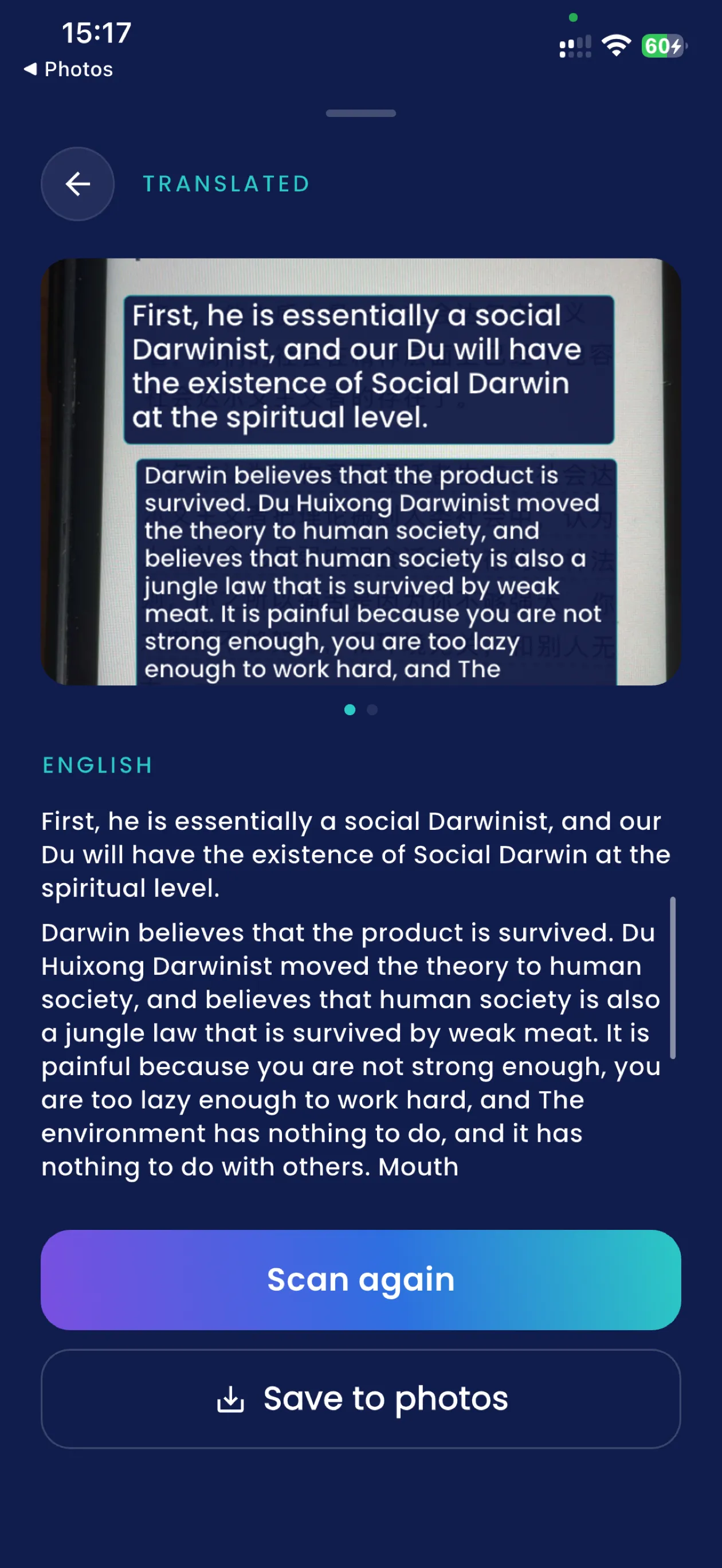
Sweep to find it, press to read it
As you move the camera, boxes light up over the text it has found. That part costs nothing and never stops — it is how you know the phone can see what you can see, and where.
The shutter does the reading. It takes one photograph, reads that, and holds the answer still on the screen so you can actually get through a paragraph. Tap a particular block before you press and that is the one it translates.
Keep it, and it is in Scans with the picture, ready to show someone or save into your photos.
It does not translate as you sweep, and that was a decision
It did, for a while. On a single line of a menu it was the best thing in the app. On a paragraph it was the worst — and both of those are the same feature, which is why it is gone rather than improved.
Recognition runs about three times a second on the preview. On dense text the same paragraph came back four materially different ways across four consecutive passes, so the page churned under your eyes, and holding the phone steadier did not make a wrong reading right. Every label was cut short as well: a translation does not fit inside the original paragraph's own box, so the answer arrived as "He wi…" no matter what else was working.
So the boxes stayed and the reading moved to the shutter. One photograph, read once, held still. It is less impressive to demonstrate and far better to use, and it is the difference between a camera that looks like it is translating and one you can actually read a sign with.
25 languages read on the phone
The photograph is read on the device and no image is sent anywhere.16 more are read better with a connection but still work without one.
17 need a connection
Mostly scripts an iPhone cannot read offline at all. A scan taken without a signal is kept and translated the next time you are online, so it is worth taking anyway. Which language does what.
Your library is written to, never read
Saving a scan adds a picture to your photos. Nothing reads the library back — the camera translates what you point it at, not what is already in there. What leaves your phone.
When it is pointed at a script it cannot read
Nothing happens. That is the whole symptom — a recogniser set to Latin letters reads a Japanese menu as an empty frame and will go on doing it for as long as you are willing to stand there, with no error to tell you why.
So after about two seconds of finding nothing, the app quietly tries its other recognisers and offers you the language it thinks it is looking at. Take it or ignore it. Once you have chosen a language yourself the shutter stays live whatever the app believes, because a guess made from a photograph of a sign at an angle is worse evidence than the person holding the phone. What works with no internet.
Questions
How do I translate text with my iPhone camera?
Point the camera at the writing. Boxes light up over the text it has found, and that part is free and continuous. Press the shutter and the photograph is read and translated — over the picture, in place, and written out underneath it.
Why does the preview not translate as I move the camera?
It used to, and on a single menu line it was the best thing in the app. On a paragraph it was the worst: recognition runs about three times a second, the same block came back materially different between passes so the page churned, and every label was cut short because a translation does not fit inside the original paragraph’s own box. Reading is the shutter’s job now — one photograph, read once, held still on the screen.
Can my iPhone read the text without a connection?
In 25 of the 58 languages the phone reads the photograph itself and nothing is sent. 16 are read better online but still work on the phone without a signal, and 17 — mostly scripts an iPhone cannot read offline at all — need a connection. A scan you take without one is kept and translated the next time you are online.
What happens if it cannot read the writing at all?
A recogniser set to the wrong script does not fail, it simply finds nothing — so after a couple of seconds of finding nothing the app tries its other recognisers and offers you the language it thinks it is looking at. Take the offer or ignore it: once you have chosen a language yourself the shutter stays live whatever the app thinks, because a guess about a photograph taken at an angle is worse evidence than the person holding the phone.
Does SofiLingo look at my photo library?
No. It writes to it when you save a scan, and it opens the individual pictures you pick if you attach one to a problem report. It never reads the library otherwise, and it cannot translate a photograph you took last week — the camera reads what you point it at.
Point it at something and see
The first 15 translations are free, with ads and no card. Finding the text is free for as long as you like — it is only pressing the shutter that counts.
Get SofiLingo on the App StoreNext: translating a restaurant menu · a translator for going abroad · speaking a phrase out loud · all 58 languages